

Hey there! As a supplier of multifunction cables, I often get asked, "Can I use a multifunction cable to connect my camera to a computer?" Well, let's dive right into this topic and find out.
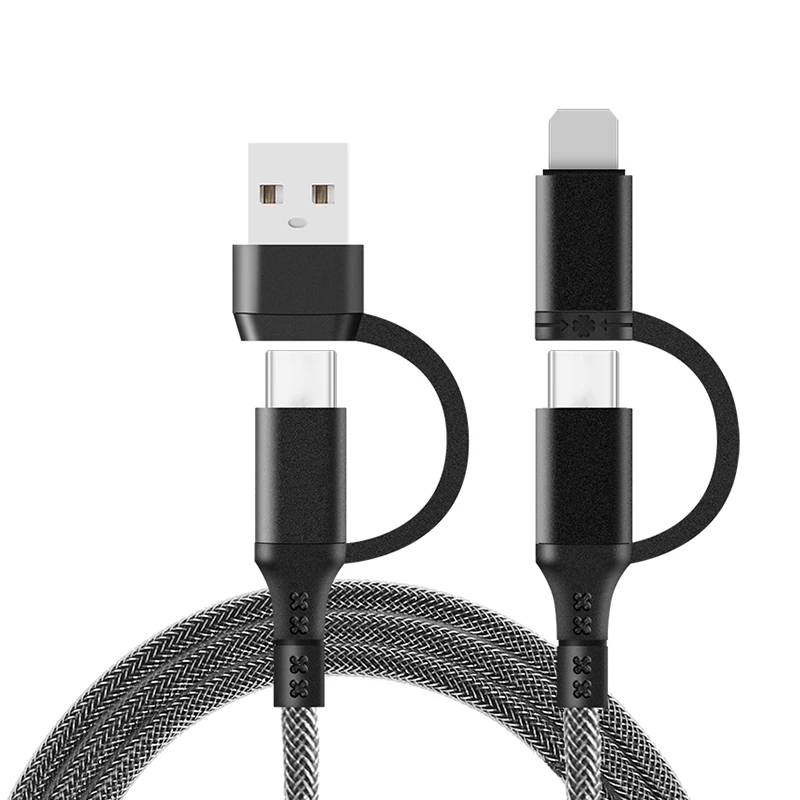
First off, what exactly is a multifunction cable? A multifunction cable, as the name suggests, is a cable that can perform multiple functions. It can be used for charging devices, transferring data, and sometimes even for audio or video transmission. We offer a wide range of these cables, like the Travel Portable 4 in 1 Multi Charging Cable for iPhone, the Multifunction Data Cable, and the 1m 3 in 1 Charging Cable for travel. These cables are designed to be versatile and convenient, making them a great addition to your tech toolkit.
Now, back to the main question: Can you use a multifunction cable to connect your camera to a computer? The short answer is, it depends. There are a few factors to consider.

Compatibility
The most important thing is compatibility. Different cameras have different types of ports, and not all multifunction cables will work with every camera. For example, some cameras use a USB Type-C port, while others use a Mini-USB or Micro-USB port. You need to make sure that the cable you choose has the right connector for your camera.
Our multifunction cables come with a variety of connectors, so chances are, we have one that will fit your camera. The Travel Portable 4 in 1 Multi Charging Cable for iPhone, for instance, has multiple connectors that can be used with different devices, including some cameras.
Data Transfer
Another thing to consider is data transfer. If you're planning to transfer photos or videos from your camera to your computer, you need a cable that can support the necessary data transfer speed. Some multifunction cables are designed for fast data transfer, while others are more focused on charging.
Our Multifunction Data Cable is specifically designed for high-speed data transfer. It uses the latest USB technology to ensure that your files are transferred quickly and efficiently. So, if you're looking to transfer large files from your camera, this cable might be a good choice.
Power Supply
In some cases, you might also want to use the cable to charge your camera while it's connected to the computer. Not all multifunction cables can provide enough power to charge a camera. You need to check the power output of the cable and make sure it's compatible with your camera's charging requirements.
The 1m 3 in 1 Charging Cable for travel is a great option if you're looking for a cable that can charge your camera as well as other devices. It has a high power output and can provide enough power to charge most cameras.
How to Connect Your Camera to Your Computer Using a Multifunction Cable
If you've determined that your multifunction cable is compatible with your camera, here's how you can connect them:
- Turn off your camera and computer: This is a good safety measure to prevent any damage to your devices.
- Connect the cable to your camera: Plug the appropriate connector of the cable into the camera's port. Make sure it's a snug fit.
- Connect the cable to your computer: Plug the other end of the cable into a USB port on your computer.
- Turn on your camera: Once the camera is turned on, your computer should recognize it. You might need to install some drivers or software, depending on your camera and computer.
- Transfer your files: Once your computer has recognized your camera, you can start transferring your photos or videos. You can use the computer's built-in file explorer or a photo management software to do this.
Troubleshooting
If you're having trouble connecting your camera to your computer using a multifunction cable, here are some things you can try:
- Check the connections: Make sure the cable is properly connected to both your camera and your computer. Try unplugging and plugging the cable back in.
- Try a different port: Sometimes, the USB port on your computer might not be working properly. Try using a different port.
- Update your drivers: Make sure you have the latest drivers installed for your camera. You can usually download these from the camera manufacturer's website.
- Check the cable: If the cable is damaged or faulty, it might not work properly. Try using a different cable.
Conclusion
So, can you use a multifunction cable to connect your camera to a computer? The answer is yes, in most cases. As long as you choose the right cable and make sure it's compatible with your camera, you should be able to transfer data and charge your camera without any problems.
We offer a wide range of multifunction cables that are designed to be compatible with a variety of devices, including cameras. Whether you're looking for a cable for data transfer, charging, or both, we have a solution for you.
If you're interested in purchasing our multifunction cables, feel free to contact us for more information. We're always happy to help you find the right cable for your needs. We can also provide you with a quote and discuss any custom requirements you might have. So, don't hesitate to reach out and start the procurement process.
References
- "USB Cable Basics" - USB Implementers Forum
- "Camera Connectivity Guide" - Various camera manufacturers' websites