

As a magnetic cable supplier, I often encounter customers who are unsure about how to test if a magnetic cable is working properly. In this blog post, I'll share some practical methods and insights based on my experience in the industry.
Understanding the Basics of Magnetic Cables
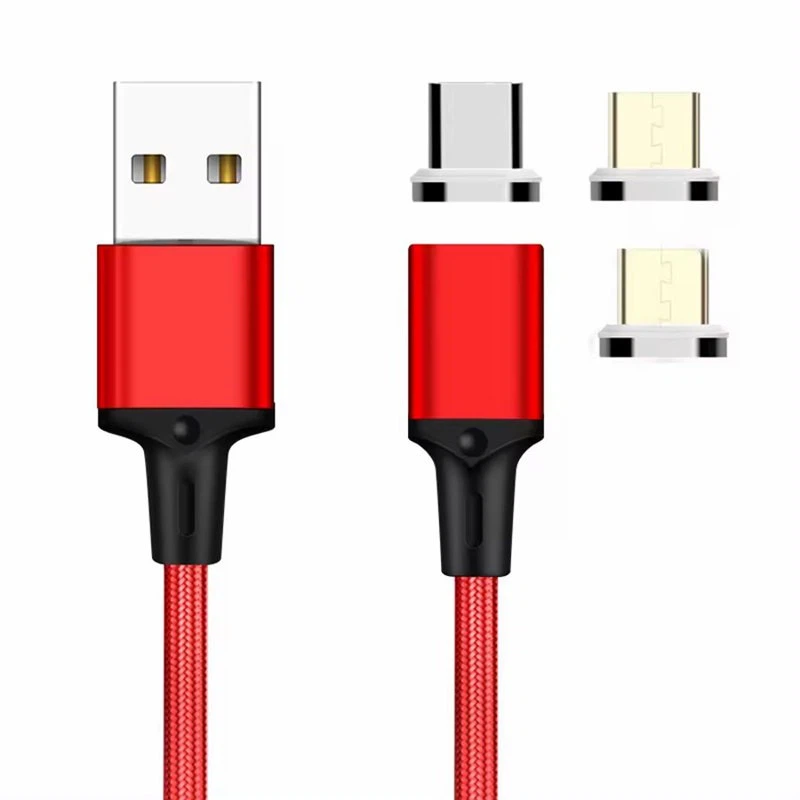
Before diving into the testing methods, it's essential to understand what a magnetic cable is and how it functions. Magnetic cables are designed with a magnetic connector at one or both ends. This magnetic feature allows for easy and secure connection between the cable and the device. The magnetic force ensures that the cable stays attached while also providing a convenient way to disconnect it quickly without causing damage to the device's charging port.
Magnetic cables are commonly used for charging various devices, such as smartphones, tablets, and smartwatches. They come in different types, including USB-C, Lightning, and Micro-USB, to accommodate different device models. The Magnetic Charging Cable for iPhone is a popular example, designed specifically for Apple devices.
Visual Inspection
The first step in testing a magnetic cable is to conduct a visual inspection. This simple yet crucial step can help you identify any obvious signs of damage or wear.
- Check the Cable Jacket: Look for any cuts, tears, or fraying on the cable jacket. A damaged cable jacket can expose the internal wires, which may lead to electrical shorts or other issues. If you notice any damage, it's best to replace the cable immediately.
- Inspect the Magnetic Connector: Examine the magnetic connector for any signs of damage, such as bent pins or a loose magnet. A damaged connector may not make a proper connection with the device, resulting in charging problems. If the connector appears to be damaged, try cleaning it gently with a soft, dry cloth. If the problem persists, the cable may need to be replaced.
- Verify the Cable Length: Ensure that the cable is the appropriate length for your needs. A cable that is too short may not reach the device, while a cable that is too long may cause signal loss or other issues.
Testing the Magnetic Connection
Once you've completed the visual inspection, the next step is to test the magnetic connection. A strong and reliable magnetic connection is essential for the proper functioning of the cable.
- Attach the Cable to the Device: Carefully align the magnetic connector with the charging port on the device. You should feel a strong magnetic force pulling the connector into place. If the connector doesn't attach easily or feels loose, there may be an issue with the magnet or the connector.
- Check for a Secure Fit: Once the cable is attached, gently tug on it to ensure that it stays securely connected to the device. A proper magnetic connection should hold the cable in place without any significant movement. If the cable comes loose easily, try cleaning the connector or the charging port on the device.
- Test the Disconnection: To test the disconnection feature, gently pull the cable away from the device. The cable should disconnect easily without causing any damage to the device or the cable. If the cable is difficult to disconnect or causes damage when disconnected, there may be an issue with the magnetic force or the connector.
Testing the Charging Function
The primary function of a magnetic cable is to charge the device. Therefore, it's crucial to test the charging function to ensure that the cable is working properly.
- Connect the Cable to a Power Source: Plug the cable into a power source, such as a wall charger or a USB port on a computer. Make sure that the power source is working properly by testing it with another device.
- Monitor the Charging Indicator: Once the cable is connected to the power source and the device, check the charging indicator on the device. The indicator should show that the device is charging. If the indicator doesn't show that the device is charging, try disconnecting and reconnecting the cable, or try using a different power source.
- Check the Charging Speed: If the device is charging, monitor the charging speed. The charging speed may vary depending on the device and the power source, but it should be relatively consistent. If the charging speed is significantly slower than usual, there may be an issue with the cable or the power source.
Testing the Data Transfer Function
In addition to charging, many magnetic cables also support data transfer. If your cable is designed for data transfer, it's important to test this function as well.
- Connect the Cable to a Computer: Plug the cable into a USB port on a computer. Make sure that the computer is turned on and that the USB port is working properly.
- Access the Device on the Computer: Once the cable is connected to the computer, the device should appear as a removable drive or a connected device. If the device doesn't appear on the computer, try disconnecting and reconnecting the cable, or try using a different USB port on the computer.
- Transfer Data: To test the data transfer function, try transferring some files from the device to the computer or vice versa. The transfer should be smooth and without any errors. If the transfer is slow or if there are errors, there may be an issue with the cable or the device.
Testing the Compatibility
Magnetic cables are designed to be compatible with specific devices. Therefore, it's important to test the compatibility of the cable with your device to ensure that it works properly.
- Check the Device Compatibility: Before purchasing a magnetic cable, make sure that it is compatible with your device. Check the product specifications or the manufacturer's website for information on device compatibility.
- Test the Cable with Different Devices: If possible, test the cable with different devices to ensure that it is compatible with a variety of devices. This can help you identify any compatibility issues and ensure that the cable is versatile and useful.
- Update the Device Software: Sometimes, compatibility issues can be resolved by updating the device software. Make sure that your device has the latest software updates installed to ensure optimal compatibility with the cable.
Troubleshooting Common Issues
Even if you've followed all the testing steps, you may still encounter some common issues with the magnetic cable. Here are some troubleshooting tips to help you resolve these issues:
- Charging Problems: If the device isn't charging or is charging slowly, try cleaning the connector and the charging port on the device. You can also try using a different power source or a different cable.
- Data Transfer Issues: If you're experiencing data transfer problems, try updating the device software or the drivers on the computer. You can also try using a different USB port or a different cable.
- Magnetic Connection Problems: If the magnetic connection is weak or loose, try cleaning the connector or the charging port on the device. You can also try using a different cable or a different device.
Conclusion
Testing a magnetic cable is a simple yet important process that can help you ensure that the cable is working properly and that it is compatible with your device. By following the steps outlined in this blog post, you can easily test the magnetic connection, the charging function, the data transfer function, and the compatibility of the cable. If you have any questions or need further assistance, please don't hesitate to contact us. We're a leading magnetic cable supplier, and we're committed to providing high-quality products and excellent customer service. If you're interested in purchasing magnetic cables for your business or personal use, we'd love to hear from you. Contact us today to discuss your requirements and explore our wide range of magnetic cable options.

References
- Manufacturer's documentation for magnetic cables
- Industry standards for charging cables and data transfer cables